



Quick Summary
Website speed directly impacts SEO, user experience, and conversions. This guide explains how to optimize website performance step by step and achieve 90+ Google PageSpeed scores.
Table of Contents
Introduction: Why Website Speed Matters
Website speed is no longer just a technical detail. It affects search rankings, user trust, bounce rates, and conversion performance. Google uses speed-related signals like Core Web Vitals to rank websites, and users expect pages to load in seconds.
A PageSpeed Insights score of 90 or above usually indicates a fast, stable, and user-friendly website. Achieving this score is not about shortcuts or plugins alone. It requires a structured optimization process that improves how a website loads, renders, and responds to user actions. Explore BrandingBeez's performance-focused web development services.
A PageSpeed Insights score of 90 or above usually indicates a fast, stable, and user-friendly website. Achieving this score is not about shortcuts or plugins alone. It requires a structured optimization process that improves how a website loads, renders, and responds to user actions. Explore BrandingBeez's performance-focused web development services.
Speed Optimization Is a Process, Not a Tool
There is no single plugin or setting that guarantees a high PageSpeed score. Real optimization focuses on the full delivery path of a website, including hosting, code, images, and scripts.
Treat website speed optimization as a repeatable process rather than a one-time fix. This approach ensures long-term performance instead of temporary improvements. See how we implement systematic speed optimization.
Treat website speed optimization as a repeatable process rather than a one-time fix. This approach ensures long-term performance instead of temporary improvements. See how we implement systematic speed optimization.
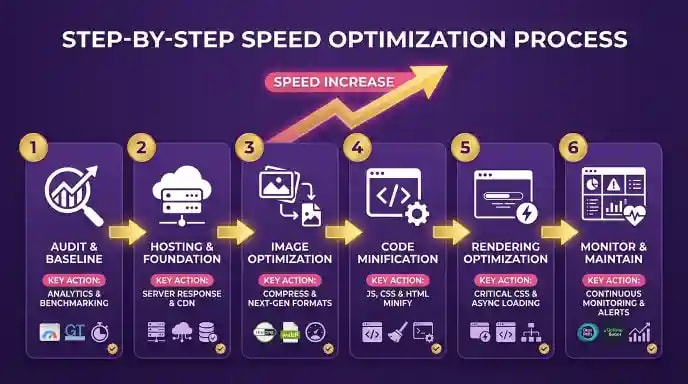
Step 1: Website Speed Audit and Baseline
Before making changes, measure current performance.
Key actions:
- Run Google PageSpeed Insights on important pages
- Focus on mobile scores, as they are more strict
- Review Core Web Vitals:
* Largest Contentful Paint for load speed
* Interaction to Next Paint for responsiveness
* Cumulative Layout Shift for visual stability
This audit identifies the main issues such as heavy images, unused JavaScript, or slow server response. Request a free website performance audit.
Key actions:
- Run Google PageSpeed Insights on important pages
- Focus on mobile scores, as they are more strict
- Review Core Web Vitals:
* Largest Contentful Paint for load speed
* Interaction to Next Paint for responsiveness
* Cumulative Layout Shift for visual stability
This audit identifies the main issues such as heavy images, unused JavaScript, or slow server response. Request a free website performance audit.

Step 2: Hosting and Delivery Foundation
Website hosting plays a major role in speed performance.
Important improvements:
- Use performance-focused hosting instead of low-cost shared servers
- Enable server-side caching to reduce load time
- Use a Content Delivery Network to serve files from nearby locations
- Ensure modern server software and PHP versions are active
A strong foundation makes all other optimizations more effective. Learn about our hosting and infrastructure recommendations.
Important improvements:
- Use performance-focused hosting instead of low-cost shared servers
- Enable server-side caching to reduce load time
- Use a Content Delivery Network to serve files from nearby locations
- Ensure modern server software and PHP versions are active
A strong foundation makes all other optimizations more effective. Learn about our hosting and infrastructure recommendations.
Step 3: Image and Asset Optimization
Images and scripts usually cause the biggest speed issues.
Image optimization steps:
- Compress images without losing quality
- Convert images to modern formats like WebP
- Serve images at correct display sizes
- Add width and height attributes to prevent layout shifts
- Enable lazy loading for offscreen images
Code optimization steps:
- Minify CSS and JavaScript files
- Remove unused CSS
- Defer non-critical JavaScript such as chat tools or tracking scripts
These changes significantly improve load speed and user interaction. View our portfolio of high-performance websites
Image optimization steps:
- Compress images without losing quality
- Convert images to modern formats like WebP
- Serve images at correct display sizes
- Add width and height attributes to prevent layout shifts
- Enable lazy loading for offscreen images
Code optimization steps:
- Minify CSS and JavaScript files
- Remove unused CSS
- Defer non-critical JavaScript such as chat tools or tracking scripts
These changes significantly improve load speed and user interaction. View our portfolio of high-performance websites

Step 4: Rendering and Advanced Improvements
Advanced optimizations help push scores beyond 90.
Key actions:
- Inline critical CSS for above-the-fold content
- Load remaining styles asynchronously
- Use proper font loading settings to prevent invisible text
- Reduce render-blocking resources
For high-traffic websites, modern frameworks or static delivery methods can further improve performance by serving pre-built pages. Discover our advanced web development solutions.
Key actions:
- Inline critical CSS for above-the-fold content
- Load remaining styles asynchronously
- Use proper font loading settings to prevent invisible text
- Reduce render-blocking resources
For high-traffic websites, modern frameworks or static delivery methods can further improve performance by serving pre-built pages. Discover our advanced web development solutions.
Measuring the Real Impact of Speed
Speed improvements should be measured beyond PageSpeed scores.
Track:
- Lower bounce rates
- Higher engagement time
- Improved conversion rates
- Better mobile usability
Website speed improvements directly influence business outcomes, not just technical metrics. Read our SEO case studies showing performance improvements.
Track:
- Lower bounce rates
- Higher engagement time
- Improved conversion rates
- Better mobile usability
Website speed improvements directly influence business outcomes, not just technical metrics. Read our SEO case studies showing performance improvements.
Maintaining Website Speed Over Time
Website performance naturally degrades as new content, plugins, and scripts are added.
Best practices:
- Review speed performance quarterly
- Compress new images automatically
- Monitor Core Web Vitals regularly
- Fix regressions early
Ongoing monitoring keeps websites fast and competitive. Explore our website maintenance and support plans.
Best practices:
- Review speed performance quarterly
- Compress new images automatically
- Monitor Core Web Vitals regularly
- Fix regressions early
Ongoing monitoring keeps websites fast and competitive. Explore our website maintenance and support plans.
Learn More About Performance Optimization
For deeper insights into performance-focused web optimization, explore our web development and optimization services. Many businesses achieve and maintain high PageSpeed scores through partnerships with specialized development teams. This approach combines technical expertise with systematic optimization processes, ensuring websites remain fast without requiring in-house performance specialists. Learn about our white-label web development partnerships.
Frequently Asked Questions (FAQ)
What is website speed optimization?
It is the process of improving how fast a website loads, renders, and responds to user actions.
What is a good Google PageSpeed score?
A score of 90 or above is considered excellent and indicates strong performance.
Does website speed affect SEO?
Yes. Google uses speed and Core Web Vitals as ranking factors.
How long does speed optimization take?
Basic optimizations can take a few weeks, while advanced improvements may take longer depending on site complexity.
Should every page be optimized?
Focus first on high-traffic and high-value pages, then apply site-wide improvements.
How often should speed be checked?
Quarterly checks help maintain performance and prevent slowdowns.
Contact BrandingBeez for a website speed optimization consultation
Contact BrandingBeez for a website speed optimization consultation
Ready to Get Started?
Contact our expert team to discuss how we can help grow your business with proven digital marketing strategies.